

AIsha - AI Tax Assistant
AIsha is your friendly, built-in Artificial Intelligence Tax Assistant. AIsha is here to help you understand basic tax concepts, navigate the app, and answer common questions quickly, based on HMRC guidance and our app's functionality.
Please Note: AIsha is a helper and provides guidance only. It is not a substitute for a professional accountant. Always consult with a qualified professional or check the official HMRC guidance before making complex financial decisions or submitting your final tax declaration.
How to Use AIsha
AIsha is activated from the main navigation bar and provides immediate assistance across most screens within the app.
- Locate AIsha: Look for the "Ask AIsha" button in the top right corner of any screen, next to your profile initial (R).
- Open the Chat: Click the "Ask AIsha" button to open the chat window on the right side of your screen.
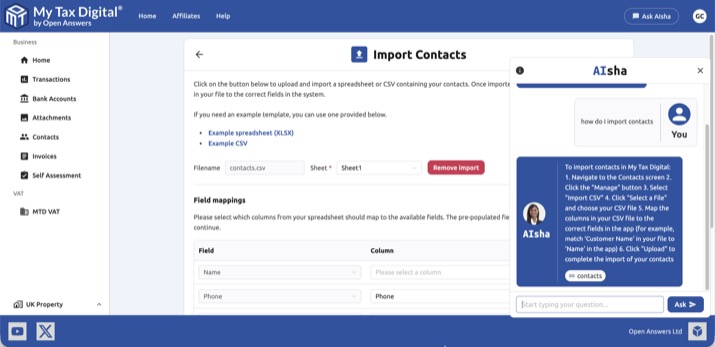
- Ask Your Question: Type your question in plain English into the text box at the bottom of the chat window. AIsha works best with direct, simple queries.
- Examples:
- "How do I submit a quarterly update?"
- "What is cash accounting for VAT?"
- "Can I claim travel expenses for a home office?"
- Examples:
- Receive an Answer: AIsha will instantly provide a simple, concise answer based on current UK tax rules and how to achieve the task within My Tax Digital.
- Closing the Chat: Click the 'X' button in the top right of the chat window to close it and return to your main tasks.
What AIsha Can Help With
| Area | Examples of Questions AIsha Can Answer |
|---|---|
| App Navigation | "Where is the VAT Liabilities screen?", "How do I import my bank data?" |
| MTD ITSA | "What is the ITSA threshold?", "When is the deadline for my periodic update?" |
| MTD VAT | "What are the 9 boxes on a VAT return?", "What is the Flat Rate Scheme percentage?" |
| Tax Concepts | "What is capital allowance?", "What is an allowable business expense?" |
What AIsha Cannot Do
- Edit or Submit Your Data: AIsha cannot change or submit your financial transactions or tax returns on your behalf. When you are signed in, AIsha may use general context about your account — such as your name, business setup, and recent activity — to give more relevant answers, but it does not have access to your transaction-level financial data or submission figures.
- Provide Financial Advice: AIsha cannot advise you on investment strategies or complex tax planning specific to your unique situation.
- Contact HMRC: AIsha cannot speak to HMRC on your behalf or resolve authorisation issues that require a Government Gateway sign-in.
Data and Privacy
When you ask AIsha a question, the text of your query is sent for processing, along with some general context about your account — such as your name, business setup, and recent activity — if you are signed in. This helps AIsha give more relevant, personalised answers. Your financial figures, individual transactions, and full submission details are never shared with AIsha.
AIsha queries are processed within UK/EEA infrastructure. Your main account data is stored on UK-based servers only.


