

Adding new Businesses and Individuals
Whether you're an accountant, a tax agent, or a business owner with several ventures, My Tax Digital is designed to scale with you.
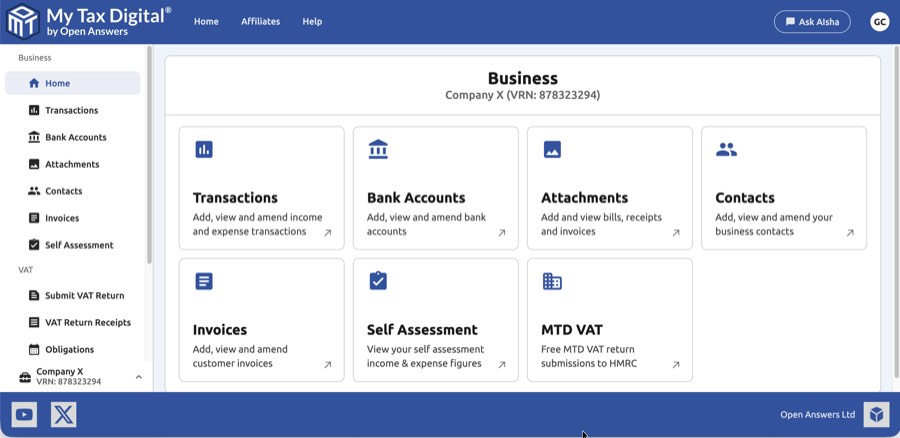
-
Add new: From left hand menu, find and click the button labelled "+ Add new".
-
Choose Business or Individual: The screen asks, "What would you like to add?" Select one of the two main options based on your tax requirements:
- Business: Manage and maintain income and expense transactions, invoices and contacts and optionally submit MTD VAT Returns. If you already have an Individual set up for ITSA and now also need to submit VAT, add a Business entity as well — VAT and ITSA are handled by different entity types, but both can exist in the same account.
- Individual: Manage and maintain digital records and submit quarterly summaries to HMRC to comply with MTD for Income Tax Self Assessment (ITSA). This entity type covers personal Income Tax Self Assessment only — for a sole trader or landlord with a UK National Insurance number. Trusts, estates, and limited companies are outside the scope of MTD ITSA and cannot use an Individual entity; a Trust or company that is VAT-registered can still use My Tax Digital for VAT via a Business entity, but Trust and Company tax returns (SA900, CT600) are not supported.
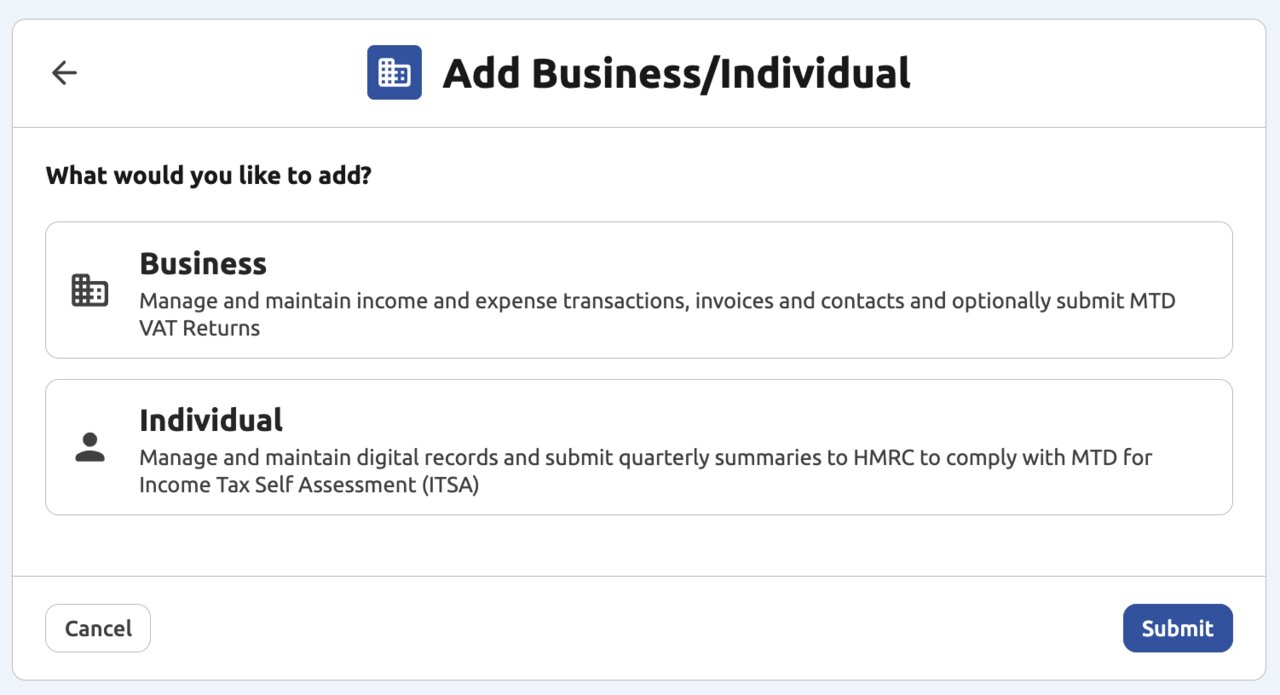
- Complete the Form for Your Choice: The form fields will change depending on whether you chose 'Business' or 'Individual'.
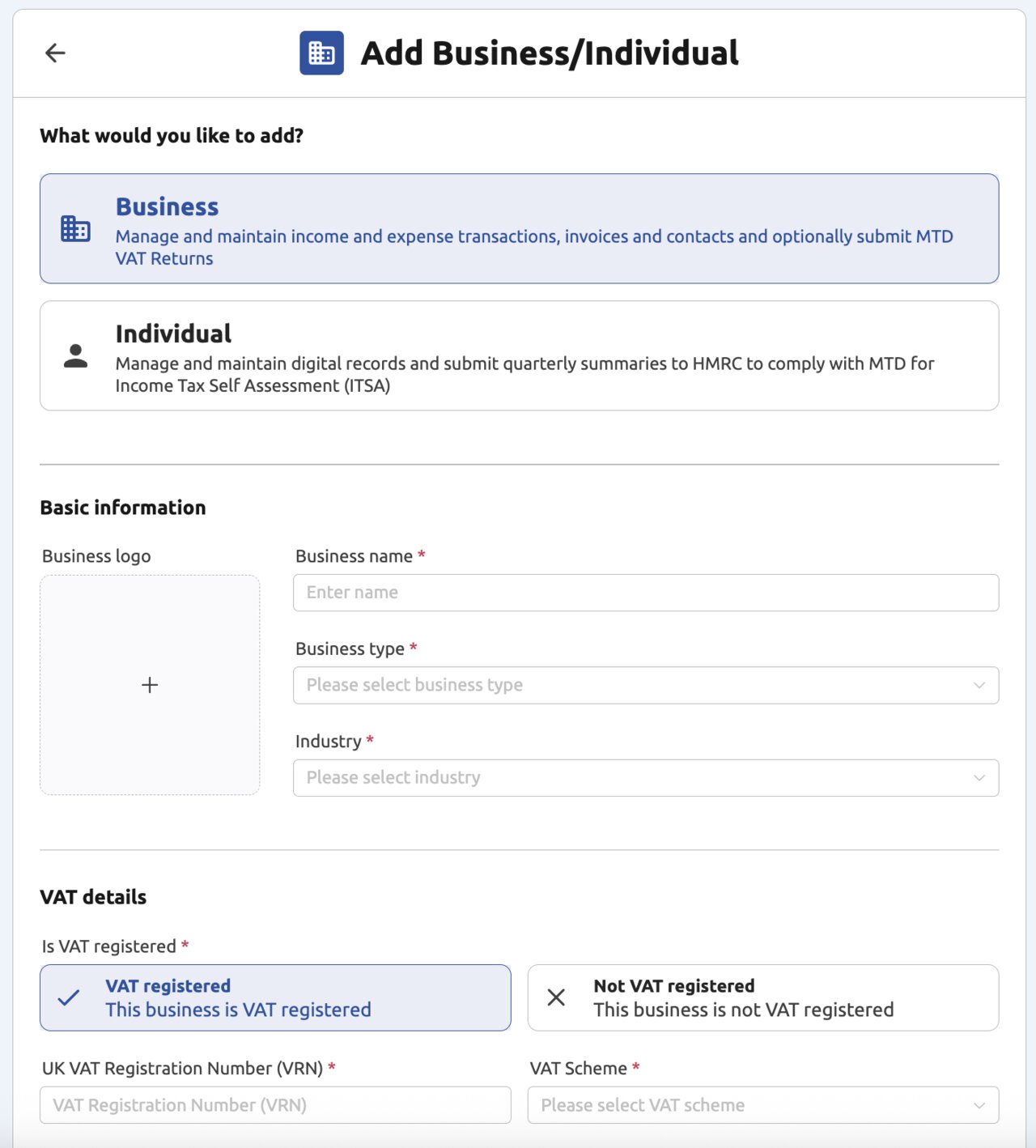
If you selected 'Business' (MTD VAT):
-
Basic Information:
- Enter the Business name.
-
VAT Details:
- Indicate if the business is VAT registered or Not VAT registered.
- If 'VAT registered' is selected, enter the UK VAT Registration Number and select your correct VAT Scheme (e.g., Standard, Flat Rate, Cash Accounting) from the drop-down list.
A VAT section appears on the home screen of every Business entity, regardless of VAT status. For non-VAT-registered businesses this section simply reflects the VAT status — no VAT return features are active, and no returns can be submitted. Only businesses marked as VAT registered will see active VAT return functionality.
-
Business Contact Details:
- Enter the registered business Address (you can search or manually enter).
- Enter the required contact information: Email and Phone (work).
- Select the Business Type and Industry from the available lists. Industry is a general business-sector classification used internally (e.g. for our own reporting) — it is never sent to HMRC and has no connection to the Construction Industry Scheme, any trade body, or any accreditation requirement. Choose whichever category most closely describes your trade; if none fits exactly, pick the closest match.
- If you are a Limited Company, you may also enter your Company Registration Number (CRN).
If you selected 'Individual' (MTD ITSA):
-
Basic Information:
- Enter your First name and Last name.
- Enter your UK National Insurance number (NINO).
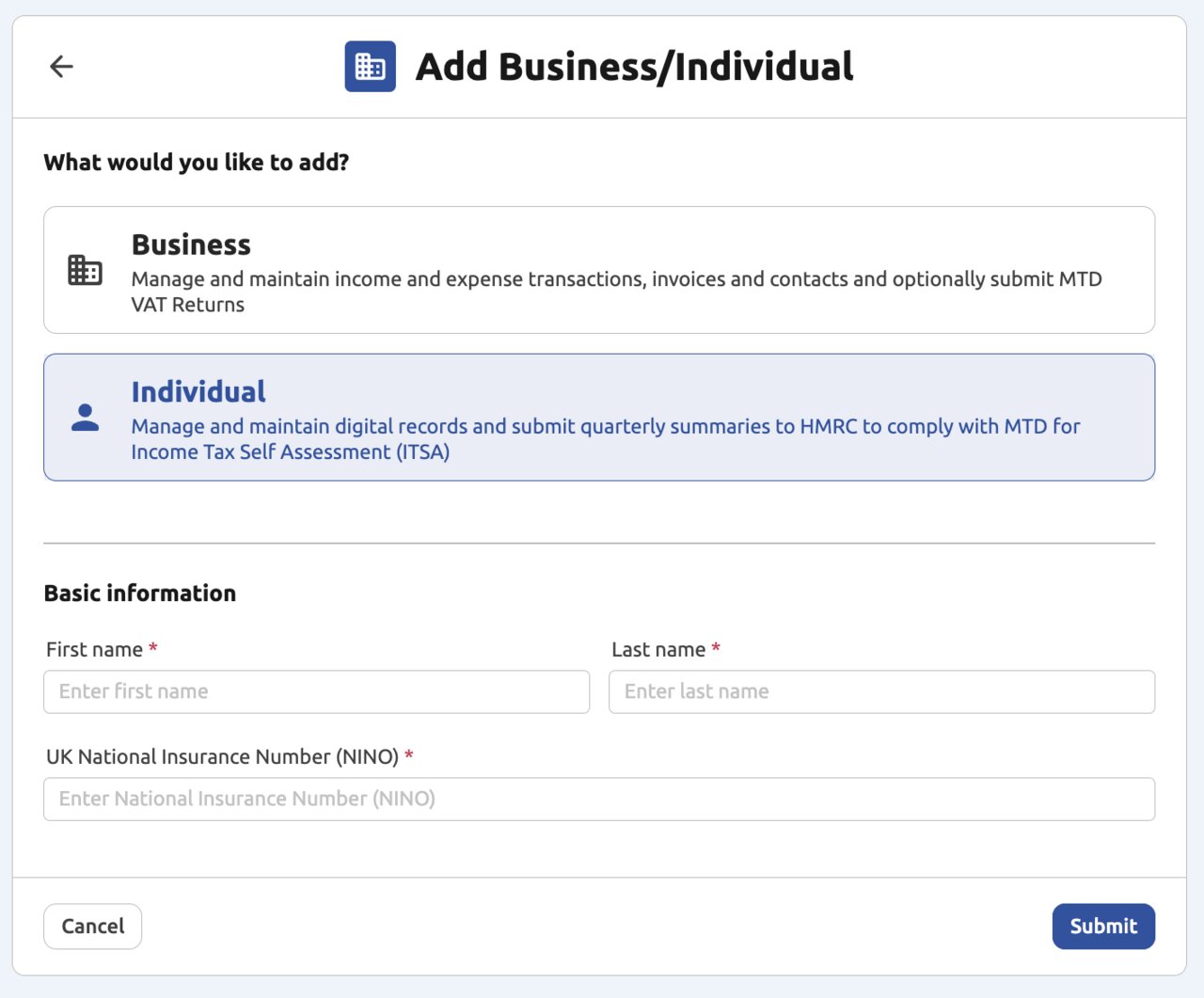
- Submission: Once all mandatory fields (marked with a red asterisk) are complete, click the "Submit" button to finalise the addition of your business or individual.
Updating a Business or Individual
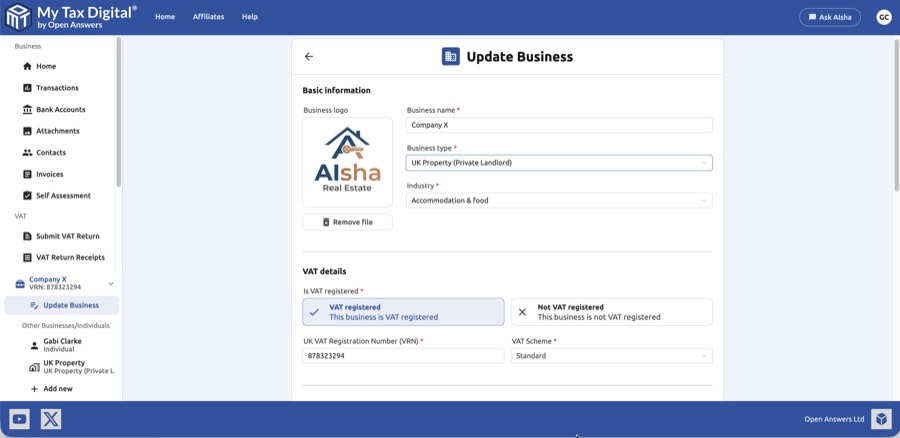
To edit an existing business, click on it in the left-hand menu and select Update Business. You can update the business name, logo, VAT details, contact information, and other settings. Click Update to save your changes.
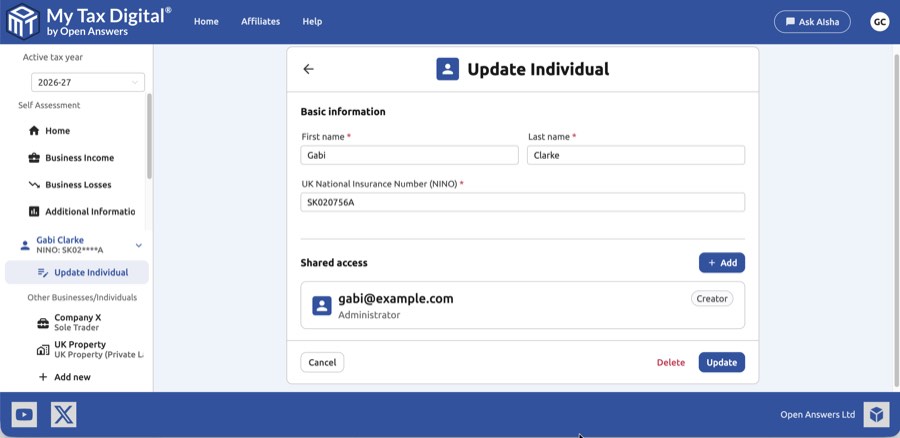
To edit an individual, click on them in the left-hand menu and select Update Individual. You can update their name, NINO, and manage shared access from this screen.
Removing a Business or Individual
To remove an individual or business from your account, open it from the left-hand menu and click Update Individual or Update Business. A Delete button appears at the bottom of the page.
Note: The Delete button is only visible to the user who originally created the individual or business. If you do not see it, you do not have permission to delete that record — contact the account owner.
Clicking Delete opens a confirmation dialog — type DELETE BUSINESS (or DELETE INDIVIDUAL, matching the record type) exactly into the text box shown, then confirm. Once confirmed, the record and all associated data will be permanently removed and cannot be recovered.
Working out which of two duplicates to delete: My Tax Digital now stops you creating a second Individual with the same National Insurance number, or a second Business with the same VAT registration number, on your own account. Duplicates created before this check was added can still exist, though. Each entity in the switcher and side menu shows its National Insurance number (masked, e.g. AB12****C) or VRN under its name, so check that first — then, if you have two entities that look identical, open each one's Business Income screen before deleting either. The one already showing income sources or submission history is the one to keep; the other is safe to remove. This still works even if both entities share the same National Insurance number and so display identical HMRC data on both — HMRC data is fetched by NINO or Business ID and looks the same either way, so submission history, not the HMRC-fed figures, is what actually distinguishes them.
Shared Access
You can grant other My Tax Digital users access to a business or individual record — for example, to give an accountant or business partner access to your account. The Shared access section appears at the bottom of the Update Business and Update Individual pages. For full details on roles and how to manage access, see the Shared Access help page.
Adding a spouse or family member
If you manage a spouse's or family member's tax affairs yourself, add them as an additional Individual under your own login. They don't need their own My Tax Digital account, and you can switch between everyone's records from your own login. Each Individual must be signed up for MTD for Income Tax in their own right, and you must complete HMRC authorisation for them using their own Government Gateway credentials, not yours. See Shared Access (Common questions) and HMRC ITSA Auth. If they would rather have their own login to their own record, use Shared Access instead.
Switching between Self Assessment and VAT
Self Assessment belongs to an Individual and VAT belongs to a Business, so if your account has both you move between them with the entity switcher at the bottom of the left-hand menu. Click it and select the Business you want. The switcher lists your other Individuals and Businesses (up to four, then More opens the full Select Business/Individual screen). A Business that is linked to a Self Assessment income source is only listed there if it is VAT-registered. Select it to reach its VAT screens.
A linked Business that isn't VAT-registered isn't listed in the switcher. Reach its records from Self Assessment > Business Income, click the income source, and use the Digital Records tiles. For a VAT-registered linked Business, the same screen also has an MTD VAT tile that switches to that Business.
Navigating Multiple Accounts
The platform makes it easy to jump between different profiles and keep your records organised:
Quick Switch: The most recently accessed Businesses and Individuals are listed in the left-hand menu for fast switching.
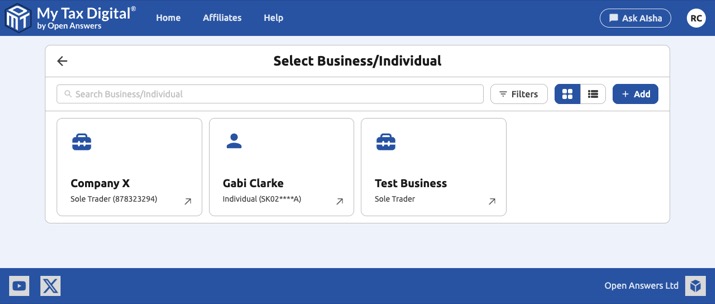
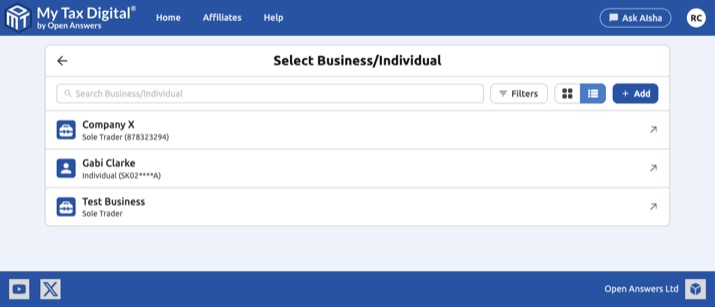
Search and Filter: To find an account not shown in the recent list, click ... More. This opens the Select Business/Individual screen. Type in the Search Business/Individual box to find an account by name, business type, National Insurance number or VRN, or use Filters to show only Businesses or only Individuals. The buttons next to + Add switch between grid view and list view, and your choice is remembered in that browser.
No Limits: There is currently no limit to the number of Businesses or Individuals you can manage, making it an ideal tool for professional tax agents.
Telling profiles apart: every Individual in the switcher and side menu shows its National Insurance number under its name (masked, e.g. AB12****C), and every Business shows its business type and VRN. This makes it easy to tell apart two profiles with the same name. The side menu stays open as you left it after switching profiles, so Update Individual / Update Business remain visible.


