

Onboarding
After your first sign-in, you will see the *Welcome to My Tax Digital screen, which asks: "How do you plan to use My Tax Digital?"
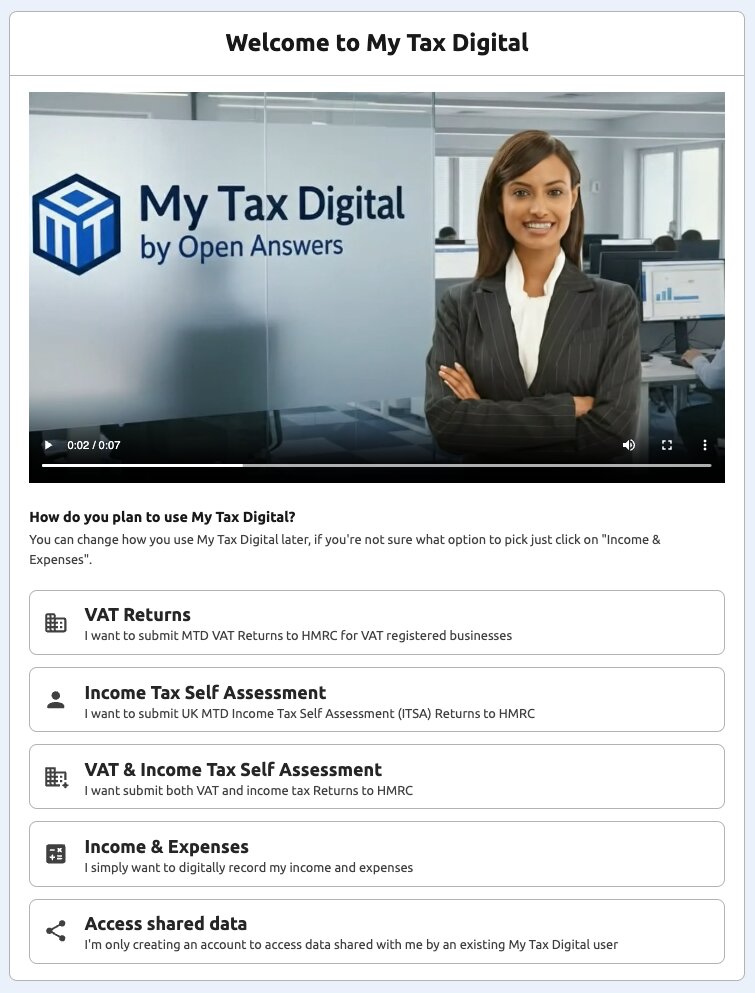
Select Your Goal: Clicking on one of the five options will take you to the correct part of the application for setup. Don't worry about making the wrong choice, all of the features will still be avialble to you.
- VAT Returns: Click this if you are a VAT-registered business or agent and need to submit MTD VAT Returns to HMRC. HMRC Authorisation for VAT.
- Income Tax Self Assessment: Click this if you are a sole trader, landlord (including UK and foreign property income) or agent and need to submit UK MTD Income Tax Self Assessment Returns (Quarterly Cumulative Updates and Final Declaration) to HMRC. HMRC Authorisation for Income Tax.
- VAT & Income Tax Self Assessment: Click this if you are mandated for both VAT and ITSA. This is common option for accountants, tax agents or large sole traders. You will be guided through the authorisation for both services. HMRC Authorisation for VAT | HMRC Authorisation for Income Tax.
- Income & Expenses: Click this if you simply want a free, digital cashbook to record your income and expenses but do not need to file tax returns with HMRC right now e.g. your income is below the MTD thresholds. This is also a good way to explore My Tax Digital's record-keeping (including the transaction templates) before you are ready to connect to HMRC — no HMRC authorisation is required for this option.
- Access shared data: Notify the user who wishes to share their data with you that your account has been created and is awaiting their action. They must log in and share the data with your registered account before you can access it. Learn more.
Switching between your Business and Individual: Many accounts have both a Business (for VAT and Accounting-mode record-keeping) and an Individual (for Income Tax Self Assessment). Use the switcher at the bottom-left of the screen — click your name — to move between them. This only lists a linked Business if it is VAT-registered; for a non-VAT-registered Business, use the Digital Records tiles on the income source home screen instead. If you cannot find Transactions or VAT, check you have switched to (or navigated into) the Business; if you cannot find Self Assessment, switch to the Individual.


