

HMRC Authorisation for VAT
Before you can submit any VAT data, you must give My Tax Digital permission to interact with your VAT account on HMRC's system.
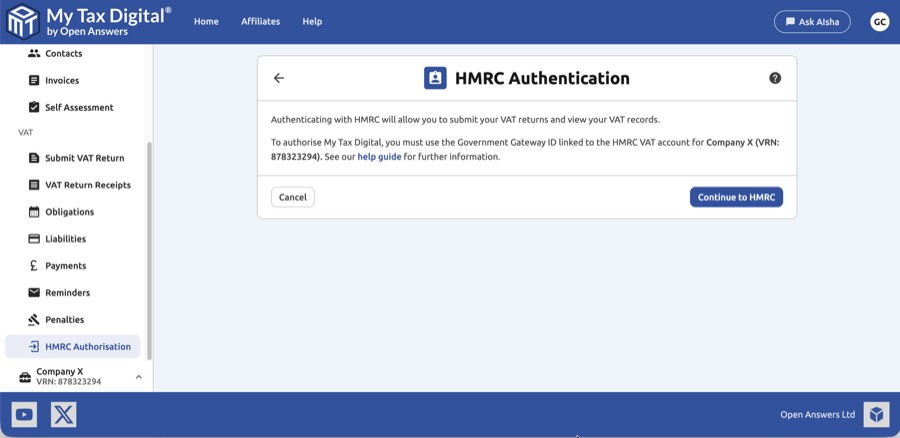
Authorisation Process
- To authorise, you first sign in to My Tax Digital and select your business.
- From the business home screen, click the "MTD VAT tile," then the "HMRC authorisation tile".
- You will need the government gateway ID that is linked to the HMRC VAT account for the VAT-registered business.
- Once you have your gateway ID, click on the "Continue to HMRC button," and then click "Continue" to allow the software to connect with HMRC.
- Click "Sign in to the HMRC online service".
- On the sign-in screen, enter the gateway ID and password linked to the VAT account and click "Sign in".
- Grant My Tax Digital permission to view and change your VAT information by clicking "Give permission".
- Confirm that the VAT registration number is correct and click "Update".
- Authorisation is now complete. You will be prompted to reauthorise approximately every 18 months by following the same process. You can now submit MTD VAT Returns.
Troubleshooting
If you receive the error message "Client or agent is not authorised" after authorising, it generally means that you have either entered the wrong VAT Registration Number (VRN) or, more likely, you did not use the gateway ID linked to your HMRC VAT account during authorisation. To check your credentials, try signing into your HMRC VAT account. If the correct VRN is not displayed, you are using the wrong gateway ID.
If a full fresh sign-in keeps bringing you back to authorisation: if you sign in from scratch, grant permission, and still land back on the authorisation screen or the "not authorised" message, the Government Gateway ID you are using is not enrolled for that VRN. Repeating the process will not change the result. Partnerships and other businesses can have a separate business or partner Government Gateway ID for VAT, so try any other IDs you hold. The one to find is the ID that was used when the VAT registration was first authorised. Signing into your HMRC VAT account with it should show the correct VRN.
If this error appears after you've edited the VRN or other business details on an already-authorised business, editing these details can invalidate the existing HMRC authorisation. Re-run the authorisation steps above to reconnect.
If the "not authorised" message keeps coming back at the VRN confirmation step (step 8), in a loop: once you've checked your VRN and Government Gateway ID as above, this is a stale connection, not a problem with your VRN. Each time you click Update on that screen, My Tax Digital checks the VRN with HMRC over your existing connection and quietly tries to refresh that connection in the background. Once the connection has gone stale, the check fails the same way however many times you click Update. Click Start again, then Confirm, and go through the authorisation steps again from step 4, signing in fresh with the Government Gateway ID linked to your VAT registration.
If you're taken to the HMRC Authentication screen with "Your HMRC credentials have expired, please re-authenticate with HMRC": HMRC has refused to renew your existing connection, and only a full sign-in will fix it. The screen may still show Status: Authorised with an earlier Authorised on date. That is the date of your last successful sign-in, not a sign that the connection still works. Click Re-authorise with HMRC (or Continue to HMRC) and complete steps 5 to 8. If you just go back to the VAT screens without doing this, the same renewal is tried again and you'll be brought back here. Brief interruptions that a background renewal can fix happen without you seeing anything, so if this message appears, the full sign-in is needed.
If authorisation is accepted but you then see an "internal server error" (HMRC returns a 500 error), for example on the Enter your VRN screen when obligations are being retrieved: this is a fault at HMRC's end. Authorising again does not fix it, so don't repeat the process. Wait and try again later. If it keeps happening, call the HMRC VAT helpline on 0300 200 3700. If a filing deadline is affected, keep a screenshot of the error showing the date and time.
If you see "An unexpected communication error occurred with the HMRC service": HMRC's service did not respond in time, or the connection to it failed. It is not an authorisation problem, and authorising again won't help. It often happens at step 8, because clicking Update checks your VRN with HMRC. It is usually temporary: wait a few minutes and try again. If it appeared when you clicked Submit on a VAT return, check the Obligations screen before submitting again; see A period is Fulfilled but has no receipt.
Notes for Agents
If you are authorising on behalf of a client business, there are two important differences from the standard flow.
Which Government Gateway credentials to use
This depends on whether you have set up client authorisation through your HMRC Agent Services Account (ASA):
- If you have ASA client authorisation in place — use your own agent Government Gateway credentials when authenticating with HMRC in step 6.
- If you have not set up ASA client authorisation — you will need to use your client's own Government Gateway credentials at that step.
If you are unsure whether ASA authorisation is in place, log in to your Agent Services Account and check whether the client appears under your authorised clients.
The VRN confirmation screen
In step 8, you will be asked to confirm the VAT Registration Number. This should be your client's VRN, not your own. Verify it matches before clicking "Update".
Authorising multiple clients
This authorisation process must be completed separately for each client you manage. Each client requires their own HMRC authorisation using your agent Government Gateway credentials.
Revoking Authorisation
There are two ways to disconnect My Tax Digital from your HMRC VAT account:
- Revoke software access only: Log in to your HMRC online services account, go to Manage account, and find the connected software or third-party applications section. Remove My Tax Digital from there. This revokes the OAuth token without affecting your VAT registration or your My Tax Digital account.
- Close your My Tax Digital account: Click your name in the top-right corner of the dashboard, select Edit Profile, and scroll to the Delete Account section. This removes your account and all associated data from My Tax Digital.
Revoking our access doesn't affect agents or other software you've authorised with HMRC directly. See Shared Access and HMRC's own authorisations in the Shared Access guide.


