

Shared Access
Shared access lets you invite other My Tax Digital users to access a specific business or individual record. It is designed for:
- Accountants and tax agents who manage records on behalf of clients
- Business partners who need to collaborate on the same account
- Employees who handle bookkeeping or accounting tasks
Each user you invite is given a role that controls exactly what they can see and do. Shared access is managed per-record — a user invited to one business does not automatically get access to any other businesses or individuals in your account.
Adding a user
- Open the relevant business or individual from the left-hand menu.
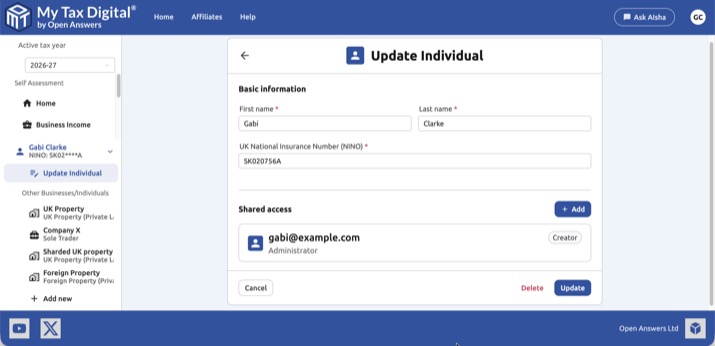
- Select Update Business or Update Individual.
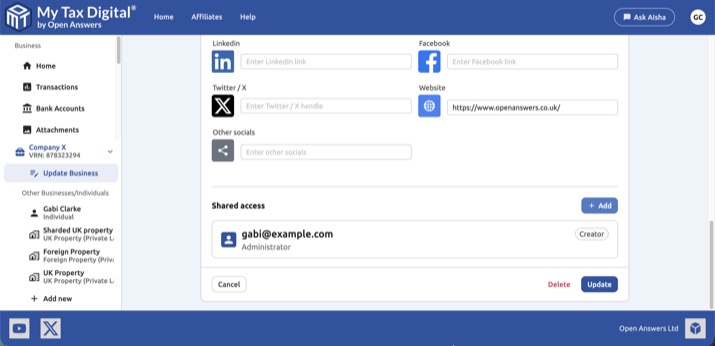
- Scroll to the Shared access section at the bottom of the page.
- Click + Add, enter the user's email address, and select one or more roles.
- Click Add to confirm.
The invited user must already have a My Tax Digital account registered to that email address.
The user who created the record is shown with a Creator badge. They always have full access and cannot be removed.
To remove a user's access, click Delete next to their entry.
Roles for a Business
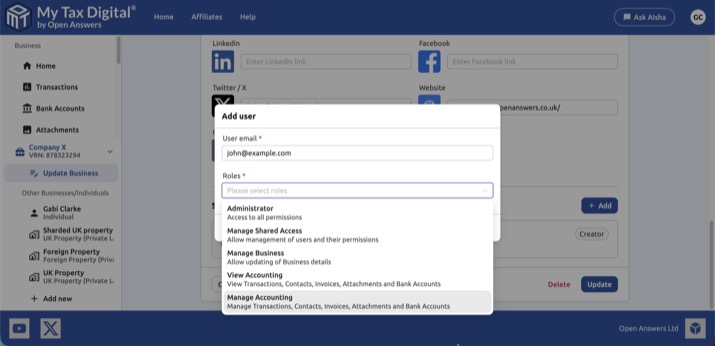
| Role | What it allows |
|---|---|
| Administrator | Full access to all permissions |
| Manage Shared Access | Add and remove other users, and change their roles |
| Manage Business | Update business name, VAT details, and contact information |
| View Accounting | Read-only access to transactions, contacts, invoices, attachments, and bank accounts |
| Manage Accounting | Full read/write access to transactions, contacts, invoices, attachments, and bank accounts |
Roles for an Individual
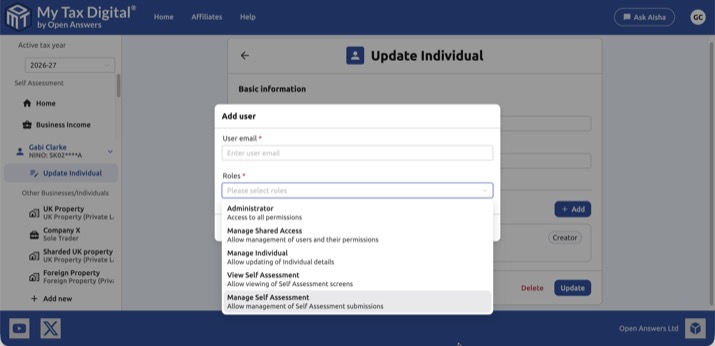
| Role | What it allows |
|---|---|
| Administrator | Full access to all permissions |
| Manage Shared Access | Add and remove other users, and change their roles |
| Manage Individual | Update the individual's name and NINO |
| View Self Assessment | Read-only access to Self Assessment screens |
| Manage Self Assessment | Submit and manage Self Assessment submissions |
Walkthrough: sharing an individual's record with another user
This example shows the complete flow for Gabi Clarke sharing her Self Assessment record with John, who is setting up a new My Tax Digital account specifically to access shared data.
Step 1 — John registers and chooses "Access shared data"
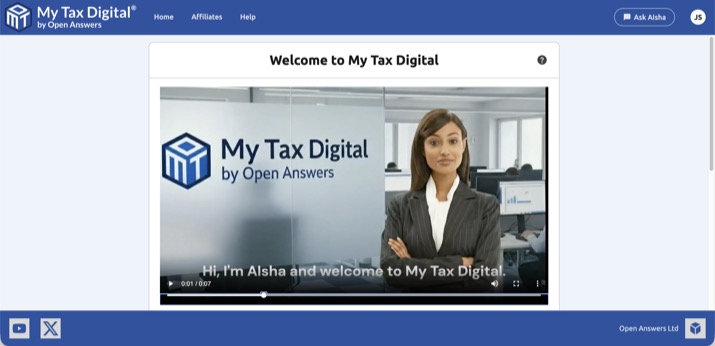
John creates a new My Tax Digital account. On the welcome screen he has no businesses or individuals yet.
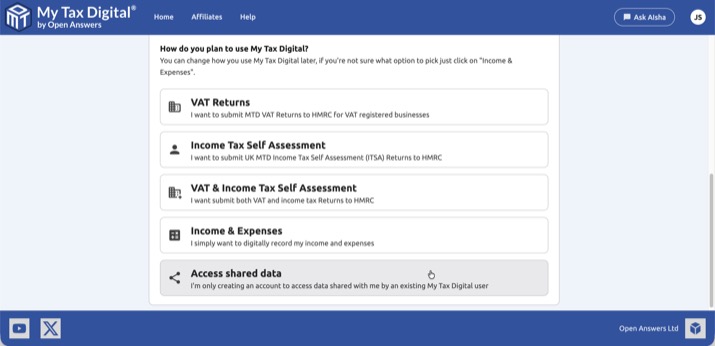
During onboarding, John is asked how he plans to use My Tax Digital. He selects Access shared data — this option is for users who are only here to access a record that someone else will share with them.
Step 2 — John waits for the share to be granted
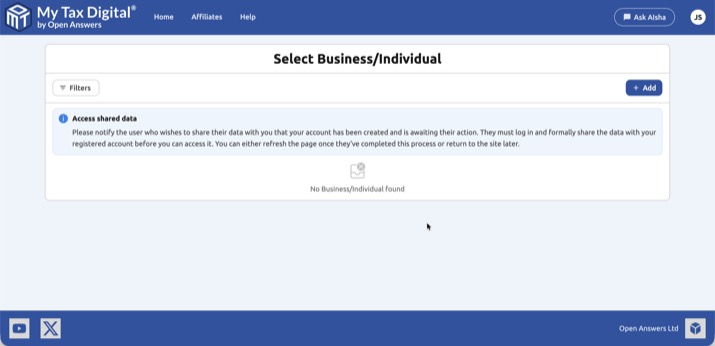
After completing registration, John sees the Select Business/Individual screen. It is empty, with a notice explaining that he must wait for the record owner to share their data with him.
Step 3 — Gabi adds John to her individual record
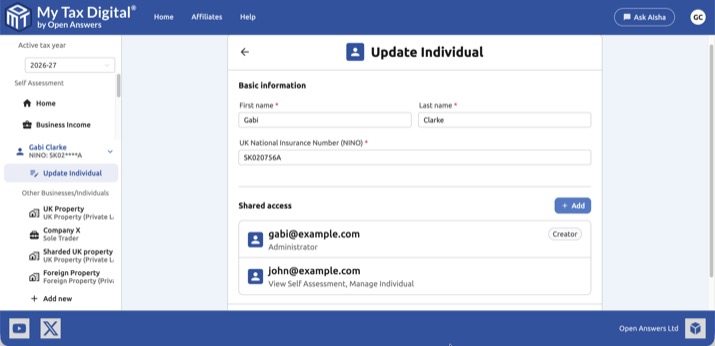
Gabi logs in, opens her individual record (Gabi Clarke), and goes to Update Individual. She clicks + Add in the Shared access section, enters john@example.com, and selects the roles she wants to grant him — in this case View Self Assessment and Manage Individual.
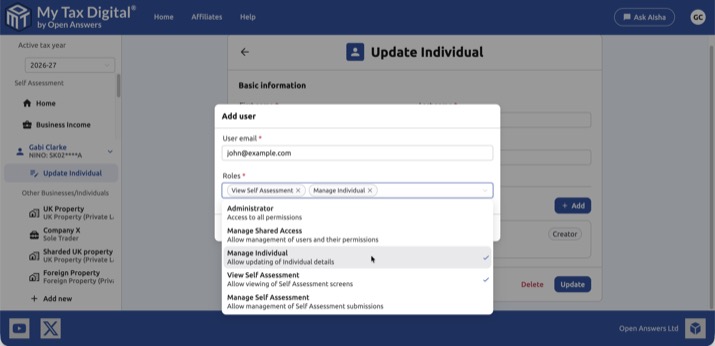
After clicking Add, the Shared access section shows both users: Gabi (Creator) and John with his assigned roles.
Step 4 — John can now access the record
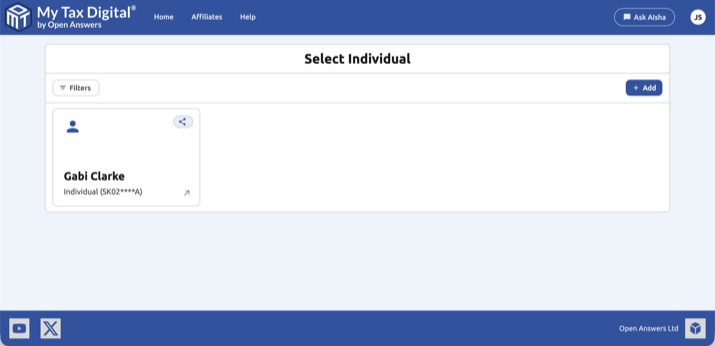
John refreshes his Select Individual screen and Gabi Clarke's record now appears, marked with a shared access icon.
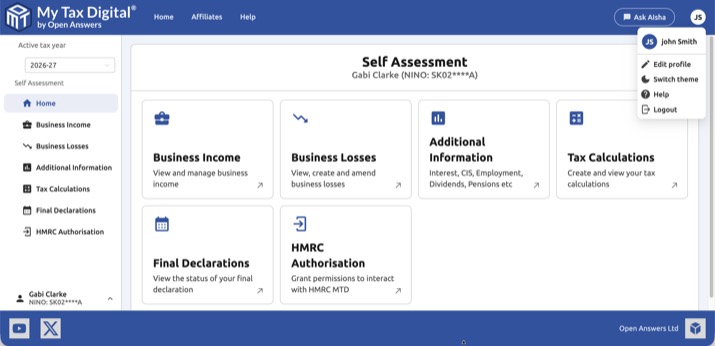
John selects Gabi Clarke's record and can now view her Self Assessment dashboard within the permissions he has been granted.
Shared Access and HMRC's own authorisations
Shared Access only controls who can see your records inside My Tax Digital. HMRC keeps its own, separate records of who can access your tax information, and nothing you do in My Tax Digital changes them. There are three separate things to check:
- My Tax Digital Shared Access: the users listed on your Business or Individual record, managed as described above.
- HMRC agent authorisations: accountants or agents you've authorised with HMRC. To check or remove these, sign in to your HMRC business tax account with your own Government Gateway login and go to Manage your tax agents. They stay in place until you remove them, even after you stop working with that agent.
- Other software connections to HMRC: a software product someone else connected to your VAT or Income Tax record, for example on a former accountant's own account. These don't always appear under Manage your tax agents. HMRC holds the full list, and only HMRC can remove them. If you're concerned, contact HMRC's VAT helpline (or the Self Assessment helpline for Income Tax). Ask whether any software or Government Gateway login currently has access to your record, and have them revoke anything you don't recognise.
If anyone else has ever had your Government Gateway user ID and password, they can sign in directly without any authorisation. Changing your Government Gateway password closes that route.
Common questions
I want to give my accountant access — what role should I choose? For an accountant who needs to manage your records and submissions, Administrator is the most straightforward choice. If you prefer to limit their access, combine Manage Accounting (or Manage Self Assessment for an individual) with Manage Shared Access if they also need to manage other team members.
My accountant says they cannot see my account after I added them. Check that the email address you entered matches the one they use to log in to My Tax Digital exactly. Shared access invitations are tied to the registered email address.
Can I submit Self Assessment for my spouse, family, or clients under my own login without them registering separately? Yes — My Tax Digital supports two ways of doing this:
- Add them as an additional Individual under your own account. From the side menu, click Add Business/Individual, add them as a separate Individual, and complete HMRC authorisation for that Individual. You can then switch between everyone's records from your own login with no separate registration or invitation needed. This suits family members whose tax affairs you manage entirely yourself.
- Shared Access, where the other person registers their own My Tax Digital account and grants you access to their record (with the Manage Self Assessment or Administrator role). This suits clients or family members who also want their own separate login to their own record.
Both routes are fully supported — choose whichever fits how involved the other person wants to be in managing their own account.
Can I have more than one user with shared access? Yes — there is no limit on the number of users you can add to a record.
Can a shared access user invite other people? Only if they have been given the Manage Shared Access or Administrator role.
Can I change a user's role after adding them? Currently you need to remove the user and re-add them with the correct role.
My colleague can see my VAT clients but not my Income Tax clients — why? Business (VAT) and Individual (Income Tax) records are separate entity types, and shared access is granted independently for each. Sharing your Businesses with a colleague does not automatically extend to your Individuals, and vice versa — you'll need to add them separately on each Individual's Update Individual screen if you want them to see your Income Tax clients too.


