

Final Declarations
This guide explains how to manage final declarations in My Tax Digital. A Final Declaration is the step where you confirm to HMRC that your Self Assessment tax return is complete and accurate for the year.
1. The Final Declarations List
The Final Declarations screen shows all final declaration obligations for the selected tax year. Each entry represents a tax year period you are required to submit a final declaration for.
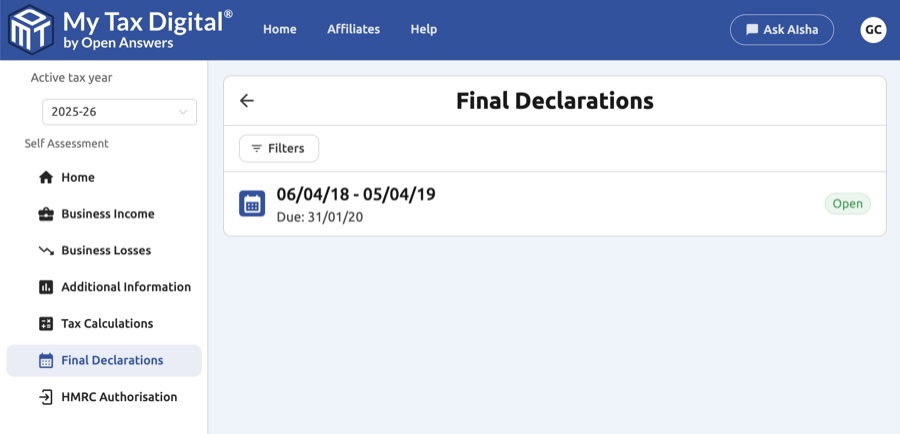
| Column | Description |
|---|---|
| Period | The start and end dates of the tax year the declaration covers (e.g. 06/04/18 - 05/04/19). |
| Due | The deadline by which the final declaration must be submitted. |
| Status | Open — not yet submitted. Fulfilled declarations have a received date instead. |
Use the Filters button to filter declarations by status (Open or Fulfilled).
2. Submitting a Final Declaration
Click an Open declaration to begin the final declaration process. The submission follows three steps:
-
Tax Calculations — clicking the declaration opens this screen. Review all in-year figures here before proceeding. All income and expenses for the year should be entered before moving to the next step, including anything from Additional Information — whether you entered that during the year or are only adding it now, none of it is used in your tax calculation until this point. See the Tax Calculations guide for details on reading the breakdown.
-
Intent to Finalise — once you are satisfied the figures are correct, click Intent to Finalise. This sends a request to HMRC asking them to produce the final tax calculation for the year. HMRC may take a short time to respond. When the calculation is ready, it will appear on screen for you to review before you proceed.
If you change Adjustments & Allowances after triggering Intent to Finalise: the existing HMRC calculation will not update automatically. You must click Intent to Finalise again to trigger a fresh calculation that reflects your changes. The new calculation will replace the old one on screen once HMRC has processed it.
-
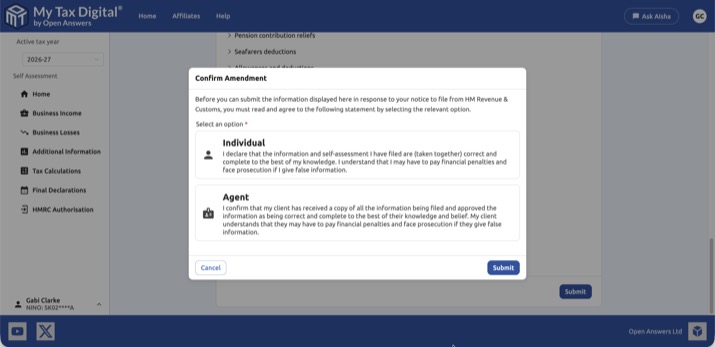
Final Declaration — once HMRC has returned the final calculation and you are satisfied with the figures, proceed to submit the declaration. You will be asked to confirm as either an Individual (filing your own return) or an Agent (filing on behalf of a client), and acknowledge the legal declaration before clicking Submit.
After you submit, the final declaration calculation stays available on the Tax Calculations screen, where it is listed as a Final declaration calculation, so you can view it again or save it as a PDF.
Important: Submitting a Final Declaration is a legal commitment. Once submitted, any corrections require an amendment to be filed.
Amending after a Final Declaration
You can amend a return for up to 12 months after the online filing deadline (for example, the 2025-26 return can be amended until 31 January 2028). Make sure the correct tax year is selected, then:
- Correct the figures on the relevant screen - the Business Income source (quarterly figures or Adjustments & Allowances) or the relevant Additional Information screen - and submit the change as normal.
- Request an Intent to Amend calculation - go to Tax Calculations, click New, check the Calculation type is Intent to amend, and click Submit. HMRC runs extra checks at this stage, and any errors are shown on the calculation.
- Confirm the amendment - review the calculation, click Submit, select whether you're filing as an Individual or an Agent in the Confirm Amendment dialog, and submit.
If you change anything after requesting the Intent to Amend calculation, request a new one before confirming. Outside the amendment window, HMRC will reject the change, and you'll need to contact HMRC.
3. After Submission — Paying Your Tax Bill
My Tax Digital handles the submission of your return to HMRC. Payment is made separately, directly to HMRC — not through this app.
Once your Final Declaration is accepted, HMRC will update your Self Assessment account with the amount due. You can then pay via:
- Your HMRC online account or the HMRC app
- Bank transfer, debit card, or other methods listed on the HMRC payment page
Deadline: Tax owed for the year must be paid by 31 January following the end of the tax year (e.g. tax for 2026–27 is due by 31 January 2028).
If you have CIS deductions, these will already be reflected as a credit in your tax calculation — you will only need to pay any remaining balance.
Payments on Account
If HMRC requires you to make Payments on Account — advance instalments towards next year's tax bill, typically due by 31 January and 31 July — these figures are calculated and held entirely by HMRC. My Tax Digital does not hold or display Payments on Account data; this is separate from the Tax Calculations screen, which shows an in-year estimate based on figures submitted through My Tax Digital, not your instalment schedule. To see what's due and by when, check your HMRC online Self Assessment account or the HMRC app, or contact HMRC on 0300 200 3310.


