

Other Employment Income
This guide explains how to use the My Tax Digital interface to record various forms of miscellaneous employment income, including disability benefits, foreign service deductions, share-based compensation, and redundancy lump sums.
1. The Other Employment Income Overview
The Other Employment Income screen acts as a hub for reporting specialized income that does not fall under standard salary or basic benefits.
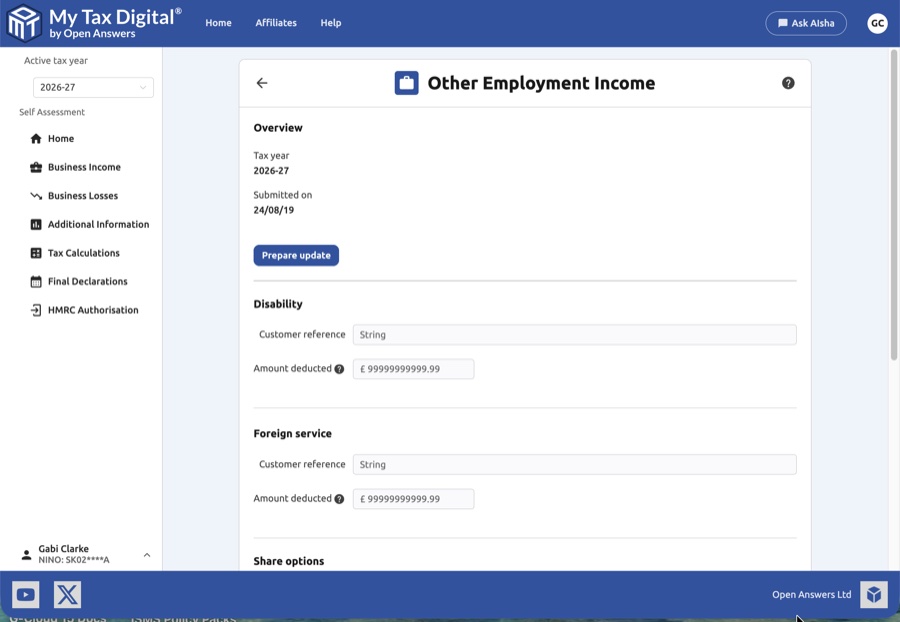
- Tax Year Context: Verify the Tax year shown at the top of the page.
- Direct Entry Fields: Sections like "Disability" and "Foreign service" allow for quick entry of reference numbers and deduction totals.
- Management Sections: Use the + Add buttons for complex categories like Share Options, Shares Awarded, and Lump Sums to open dedicated data entry modals.
- Delete All: A Delete link at the bottom of the overview allows you to clear all "Other Employment Income" data for the year.
These items are reported on SA101 (Additional Information) in the lump sums and compensation payments section.
2. Disability and Foreign Service
These fields are used to record specific deductions or references related to disability-related employment income or time spent working abroad.
| Field | Description |
|---|---|
| Customer reference | A unique identifier for your records to help track the specific benefit or service period. |
| Amount deducted | The total value of deductions applicable to this category for the tax year. |
3. Share Schemes (Options and Awards)
Use these sections to report income arising from employee share schemes. Clicking + Add opens a modal to capture the following details:
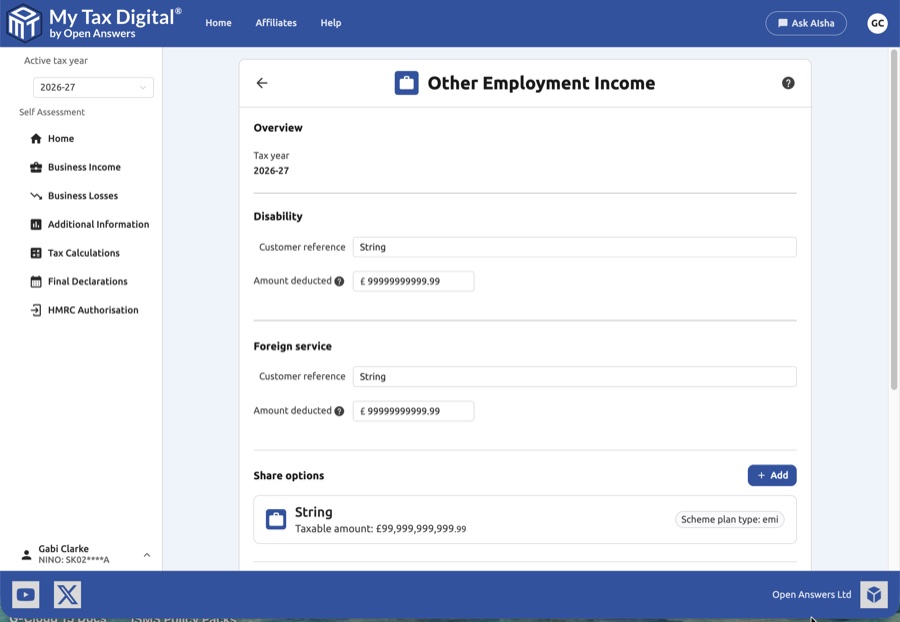
Share Options (e.g., EMI)
- Plan Details: Employer name, Employer reference, and Scheme plan type (e.g., emi - Enterprise Management Incentives).
- Event Dates: Date of option grant and the Date of the taxable event (exercise).
- Financials: Amount of consideration received, exercise price, and amount paid for the option.
- Valuations: Market value of shares on exercise and the resulting Profit on option exercised.
- Tax/NICs: Record any Employer's NIC paid and the final Taxable amount.
Shares Awarded or Received (e.g., SIP)
- Plan Details: Employer details and Scheme plan type (e.g., sip - Share Incentive Plan).
- Timeline: Date shares were awarded and the date they ceased to be subject to the plan.
- Quantities: Number and class of share securities awarded.
- Valuations: Actual market value vs. unrestricted market value on award.
- Restrictions: Toggle whether shares are subject to restrictions and if an election was entered to ignore them.
4. Lump Sums and Redundancy
This section is for reporting one-off payments such as redundancy packages or retirement scheme benefits.
General Lump Sum Details
- Employer Info: Enter the Name and Reference of the employer providing the lump sum.
- Taxable Lump Sums: Record the gross amount and any tax already paid. Toggle whether tax was taken off in employment.
Retirement & Redundancy
- Employer Financed Retirement Scheme: Report benefits received from non-registered schemes, including the exempt amount.
- Redundancy Payments: Redundancy is split into two categories based on the standard £30,000 exemption limit:
- Over Exemption: Payments exceeding the limit (fully taxable). Record the amount and tax paid.
- Under Exemption: Payments within the exempt limit (generally non-taxable but must be reported).
5. Finalising Your Submission
- Confirm: Within each modal, click Confirm to save that specific entry and return to the overview.
- Submit / Update:
- If this is your first submission for other employment income this year, the button will be labeled Submit.
- Delete Entry: Inside any modal, you can use the red Delete link to remove just that specific record.
- Cancel: Click Cancel to discard your current session's edits.


