

Foreign Income
This section allows you to record income earned outside the UK and any associated foreign tax credits. Use this guide to understand how to navigate the screen and submit your foreign income details correctly.
1. Accessing the Foreign Income Screen
When you open this screen, you will see an Overview of your current records for the current tax year.
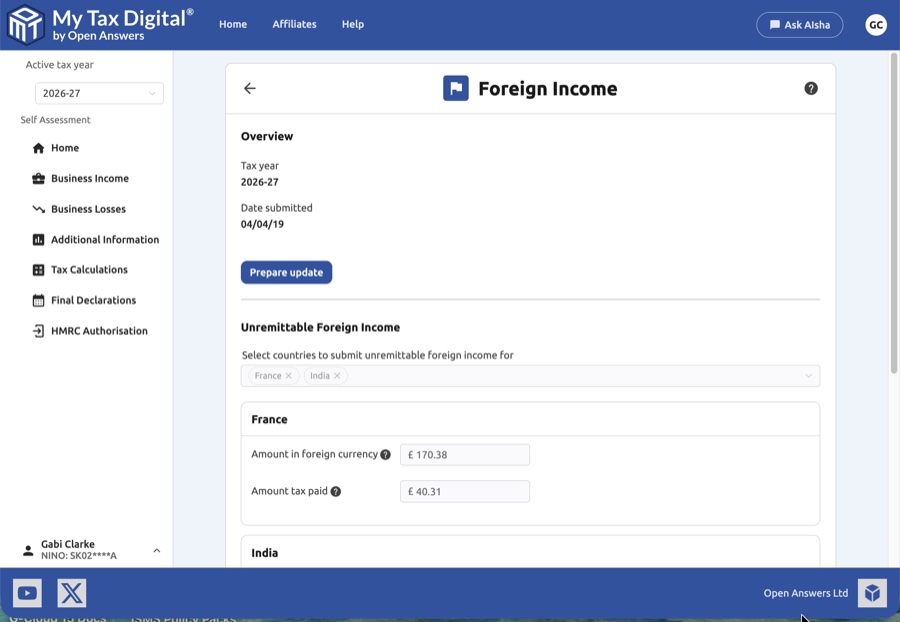
- Tax Year: Displays the current reporting period.
- Date submitted: Shows the date this information was last updated.
- Prepare update: Click this button to enter the editing mode if you need to add new countries or amend existing figures.
This screen has two distinct sections — use Unremittable Foreign Income for general foreign income you cannot yet bring into the UK, and Foreign Earnings only for the narrower case of employment/professional income exempt under a Double Taxation Agreement. If you are unsure which applies, most general foreign income (rental, investment, or business income) belongs under Unremittable Foreign Income, which is why only that section has a tax-paid field — Foreign Earnings covers income exempt from UK tax in the first place, so no UK tax-paid figure applies.
2. Unremittable Foreign Income
This section is for income earned abroad that cannot be brought into the UK due to local laws, exchange controls, or a shortage of foreign currency in the source country.
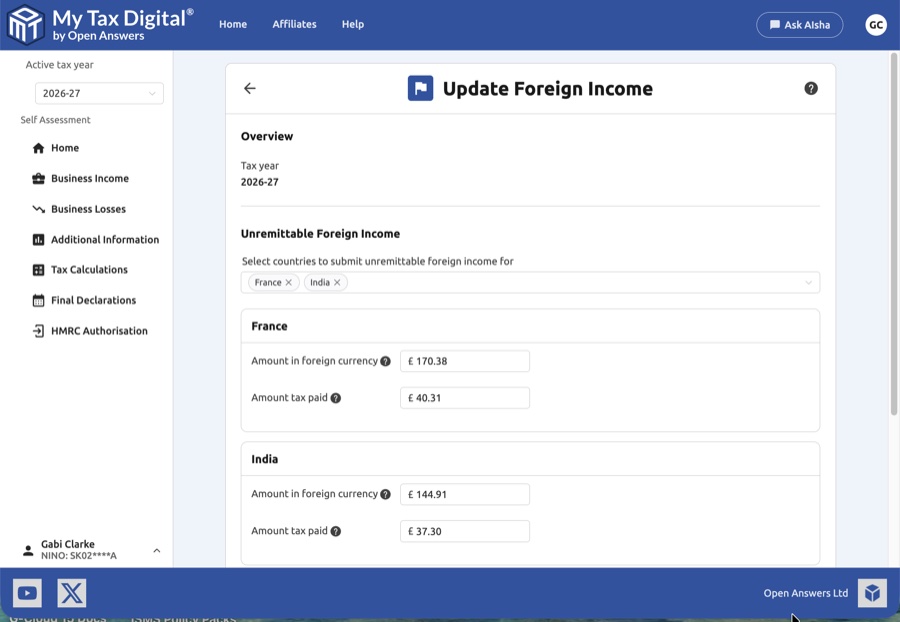
Adding a Country
- Use the Select countries dropdown list.
- Select the country (e.g. France, India) where the income was earned.
- A new entry panel will appear for each country you select.
Entering Figures
| Field | Description | SA106 |
|---|---|---|
| Amount in foreign currency | Enter the gross amount received in the local currency of that country. | — |
| Amount tax paid | Enter any tax already paid to that country's tax authority, also in the local currency. | — |
Unremittable foreign income is reported on SA106 (Foreign pages). Enter amounts in the local currency of the source country.
3. Foreign Earnings
This section relates to employment or professional income that may be exempt from UK tax.
- Customer reference: Enter a unique reference (up to 35 characters) to help you identify this specific income source in your records.
- Foreign earnings not taxable in the UK: Enter the total amount (in £) that is exempt from UK tax. This is commonly used for claims under Double Taxation Agreements or Foreign Earnings Deduction.
4. Saving and Deleting
Once you have checked your entries:
- Submit / Update:
- If this is your first submission for foreign income this year, the button will be labeled Submit.
- If you are modifying existing data, the button will be labeled Update.
- Cancel: Reverts any changes made during the current session without saving.
- Delete: Located at the bottom right, this will remove the entire foreign income record for this tax year.
Troubleshooting & Tips
- Currency Conversion: For unremittable income, enter the amounts in the local currency. For general foreign earnings not taxable in the UK, please use Pounds Sterling (£).
- Missing Countries: If a country does not appear in the list, ensure you are searching for the official name as recognised by HMRC.


