

Marriage Allowance
This guide explains how to use the My Tax Digital interface to claim Marriage Allowance. This tax relief allows you to transfer a portion of your Personal Allowance to your husband, wife, or civil partner to reduce their tax bill.
1. The Submit Marriage Allowance Screen
The Submit Marriage Allowance screen is used to provide the specific details of your partner to whom you are transferring the allowance (or from whom you are receiving it).
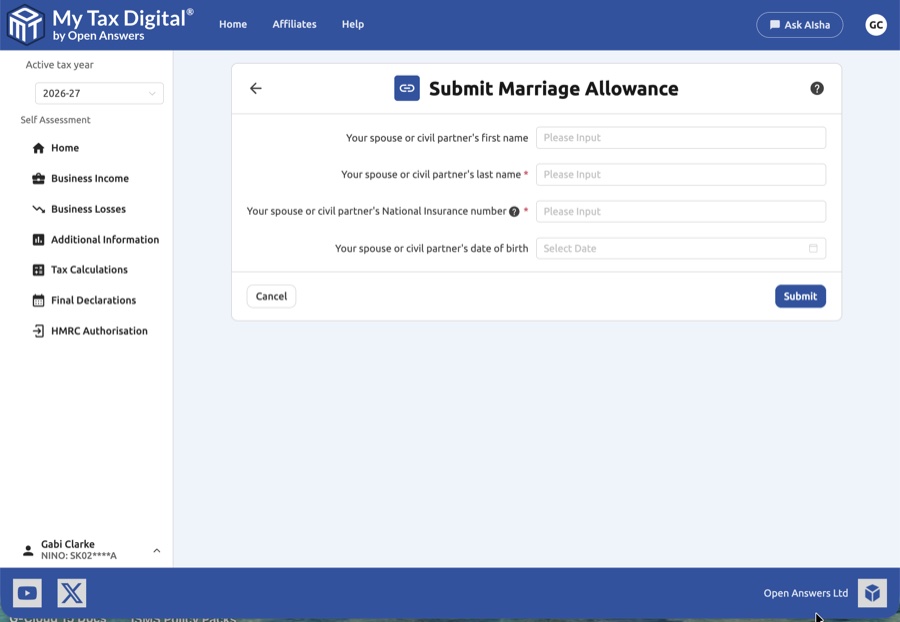
- Personal Details: You must provide the following information about your spouse or civil partner:
| Field | Description | SA100 |
|---|---|---|
| First Name | Their legal first name. | — |
| Last Name | Their legal surname. | Marriage Allowance section |
| National Insurance Number | Their 9-character NI number. | Marriage Allowance section |
| Date of Birth | Use the calendar picker to select their birth date. | — |
Marriage Allowance is reported in the Personal Allowances section of SA100.
2. Eligibility Requirements
Before submitting, ensure you meet the standard HMRC criteria for Marriage Allowance:
- You must be married or in a civil partnership.
- One partner must earn less than the Personal Allowance (typically £12,570).
- The other partner must be a basic-rate taxpayer.
3. Finalising Your Submission
Once the details for your spouse or civil partner have been accurately entered:
- Review: Verify that the National Insurance number and last name match your partner's official documents exactly, as errors may delay the claim processing.
- Submit / Update:
- If this is your first submission for this year, the button will be labeled Submit.
- Cancel: Click Cancel if you wish to exit the screen without saving or submitting the data.
4. What Happens Next?
Once submitted, HMRC will process the transfer of the allowance. This usually results in a change to the recipient's tax code, allowing them to pay less tax throughout the year.
5. Cancelling Marriage Allowance
My Tax Digital does not provide a way to cancel or revoke a Marriage Allowance claim — the HMRC API supports submission only. If you need to cancel a claim, you must do this directly with HMRC:
- Online: Log in to your HMRC Personal Tax Account, navigate to the Marriage Allowance section, and follow the steps to cancel.
- By phone: Call HMRC on 0300 200 3300.
Once HMRC processes the cancellation, the recipient's tax code will revert to the standard code.


