

Foreign Reliefs
This guide explains how to use the My Tax Digital interface to manage relief for foreign tax paid on income from abroad. This ensures you are not taxed twice on the same income (Double Taxation Relief).
1. The Foreign Reliefs Overview
The Foreign Reliefs screen provides a summary of all international tax credits and reliefs currently applied to your tax profile for the selected year.
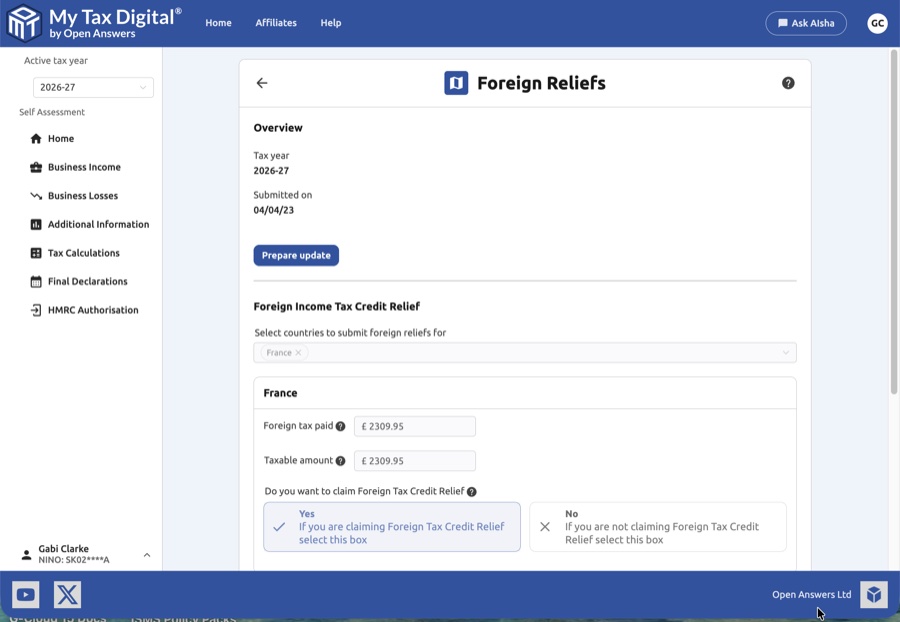
- Overview Section: Verify the Tax year shown and see the date the information was last Date submitted.
- Prepare Update: Click this button to unlock the fields and begin entering or modifying your foreign relief details.
- Summary View: Before editing, you can see a read-only list of countries (e.g., France) and the corresponding tax amounts already recorded.
- Delete: Use the Delete link at the bottom of the page to clear all foreign relief data for the specific tax year.
2. Foreign Income Tax Credit Relief
For each country where you have paid foreign tax on income, you must provide specific financial details.
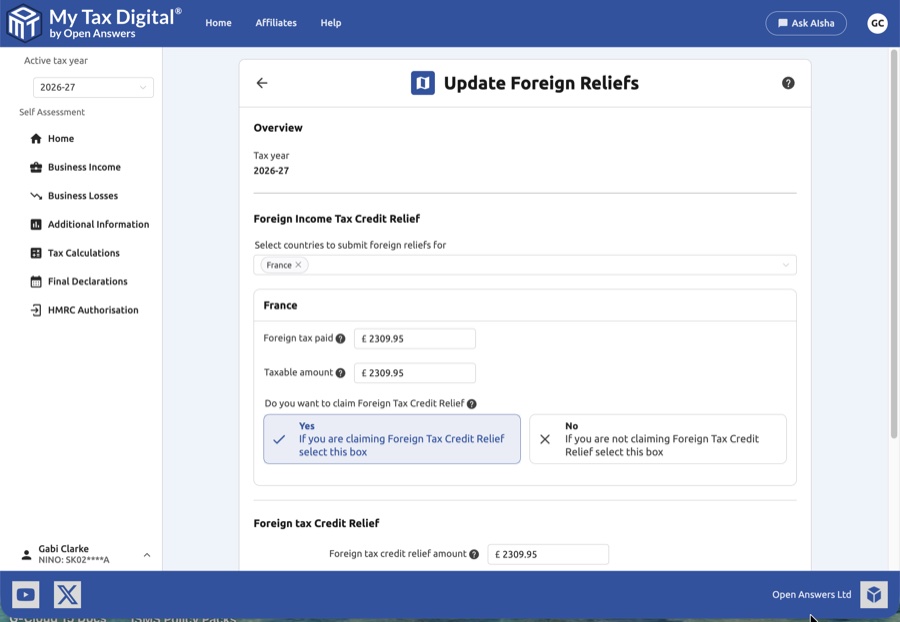
- Select Countries: Use the dropdown menu to select the relevant countries. A dedicated data entry block will appear for each selection.
| Field | Description | SA106 |
|---|---|---|
| Foreign tax paid | The total amount of tax you have already paid to the foreign government. | — |
| Taxable amount | The portion of the foreign income that is subject to tax. | — |
| Foreign tax credit relief amount | The specific FTCR amount being claimed for this country. | — |
- Claiming Relief: You must choose whether to claim Foreign Tax Credit Relief (FTCR):
- Yes: Select this to deduct the foreign tax paid directly from your UK tax liability.
- No: Select this if you are not claiming a credit; the foreign tax may instead be treated as a deduction from the gross income.
Foreign Tax Credit Relief is reported on SA106 (Foreign pages) with per-country breakdowns.
3. Additional Relief Categories
The interface also includes fields for specific relief totals that apply across your foreign income:
- Foreign tax Credit Relief: Enter the total Foreign tax credit relief amount being claimed across all sources.
- Foreign tax for FTCR not claimed: Enter the total Foreign tax for which tax credit relief not claimed (used when foreign tax is treated as a deduction rather than a credit).
4. Finalising the Submission
Once you have entered the data for all relevant countries and total relief amounts:
- Review: Ensure the figures match your foreign tax certificates or vouchers provided by the overseas tax authority.
- Submit / Update:
- If this is your first submission for foreign reliefs this year, the button will be labeled Submit.
- If you are modifying existing records, the button will be labeled Update.
- Cancel: Click Cancel to exit without saving your changes.


