

Other Income
This guide explains how to use the My Tax Digital interface to record and update various sources of "Other Income," ranging from business receipts after a company has closed to complex foreign gains and benefits.
1. The Other Income Overview
The Other Income screen provides a summary of all miscellaneous income sources currently reported for the tax year.
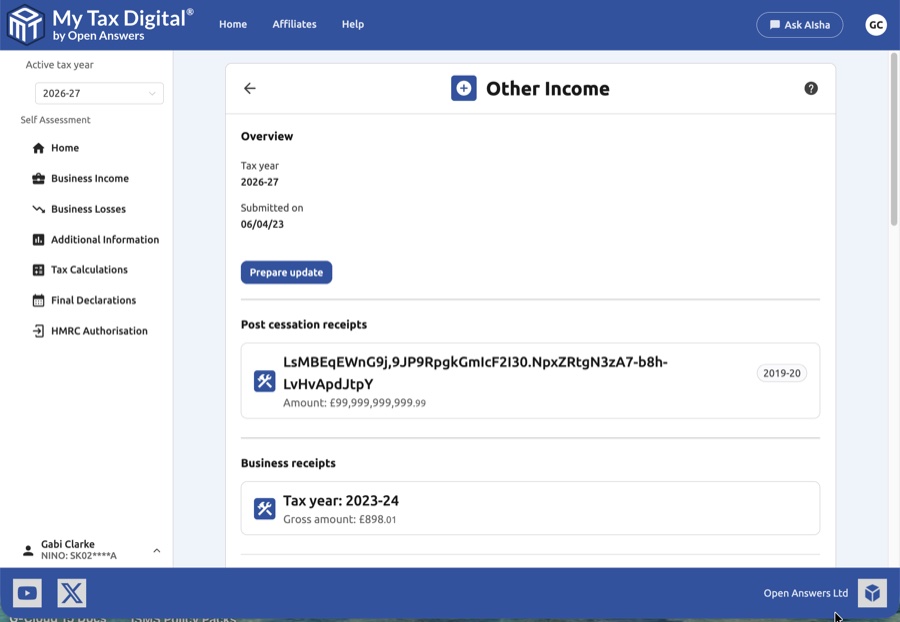
- Reporting Period: Confirm the Tax year shown and the original date the information was Submitted on.
- Prepare Update: You must click the Prepare update button to enable data entry fields and add new income blocks.
- Income Categories: The page is divided into specific sections such as Post cessation receipts, Business receipts, and Foreign-related income.
Looking for UK bank interest? That is not recorded here — see UK Interest instead. Other Income covers post-cessation and business receipts, and foreign-related income only.
Other UK income (SA100 boxes 17-21): the "Other UK income not included on supplementary pages" section of the SA100 (boxes 17-21, for example royalties not connected with a trade) has no equivalent in Making Tax Digital. HMRC's own box-to-API mapping lists these boxes as "Not available", so no MTD software can submit them, and this screen doesn't cover them. Ask HMRC or your adviser how to report this income.
2. Post-Cessation and Business Receipts
These sections are used to report income related to businesses that have finished trading or other miscellaneous business-related income.
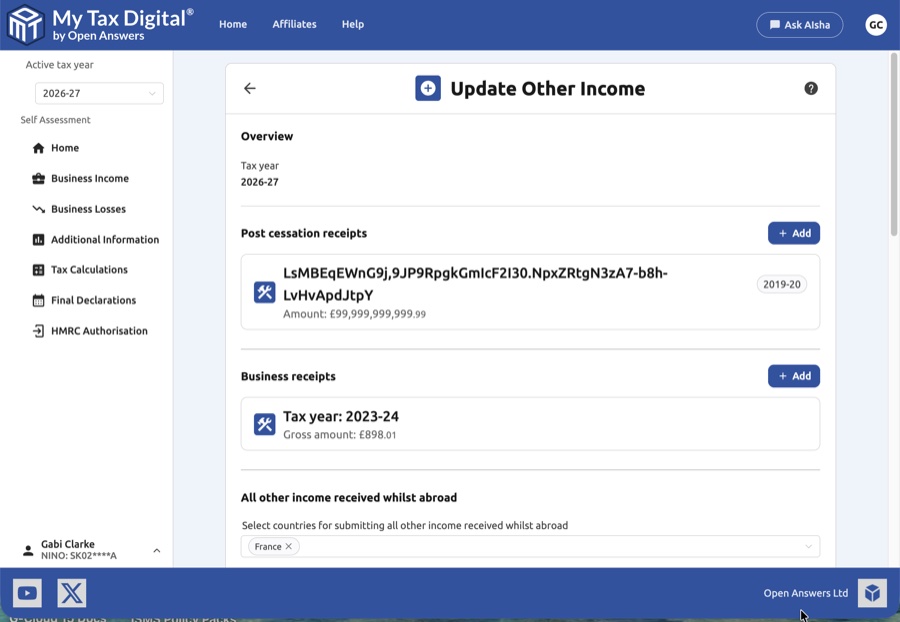
- Post Cessation Receipts: Used for income received after a business has ceased.
- Required Details: Business name, date the business ceased, a description of the business, the income source, the gross amount, and the tax year the income should be taxed in.
- Business Receipts: A simplified section to report gross amounts of business income for specific tax years.
- Adding/Editing: Click the + Add button to open a modal for new entries. Click on an existing card to edit or delete that specific record.
These receipts are reported on SA101 (Additional Information pages).
3. All Other Income Received Whilst Abroad
This section handles miscellaneous foreign income and allows for the application of foreign tax credits.
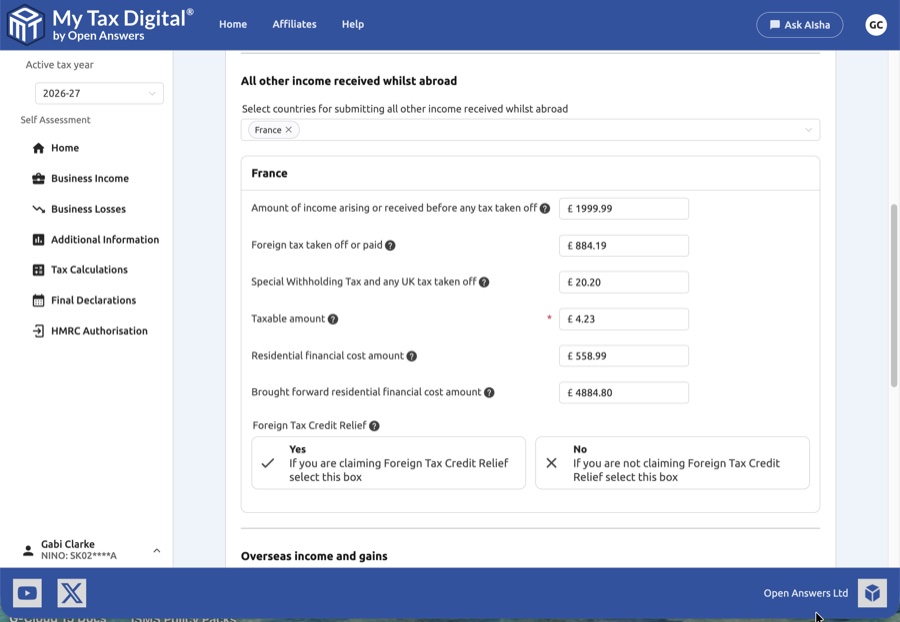
| Field | Description | SA106 |
|---|---|---|
| Amount of income arising | Total gross income received before any deductions. | — |
| Foreign tax taken off or paid | Any tax already paid to a foreign tax authority. | — |
| Taxable amount | The portion of the income subject to UK tax. | — |
| Residential financial cost | Costs related to residential property finance (Current year). | — |
| Brought forward residential financial cost | Residential financial costs carried forward from a previous year. | — |
- Foreign Tax Credit Relief (FTCR): Select Yes if you want to claim credit for tax paid abroad against your UK liability, or No if you are treating the tax as a deduction from gross income.
4. Specialized Foreign Gains and Benefits
The lower section of the page deals with complex international financial scenarios.
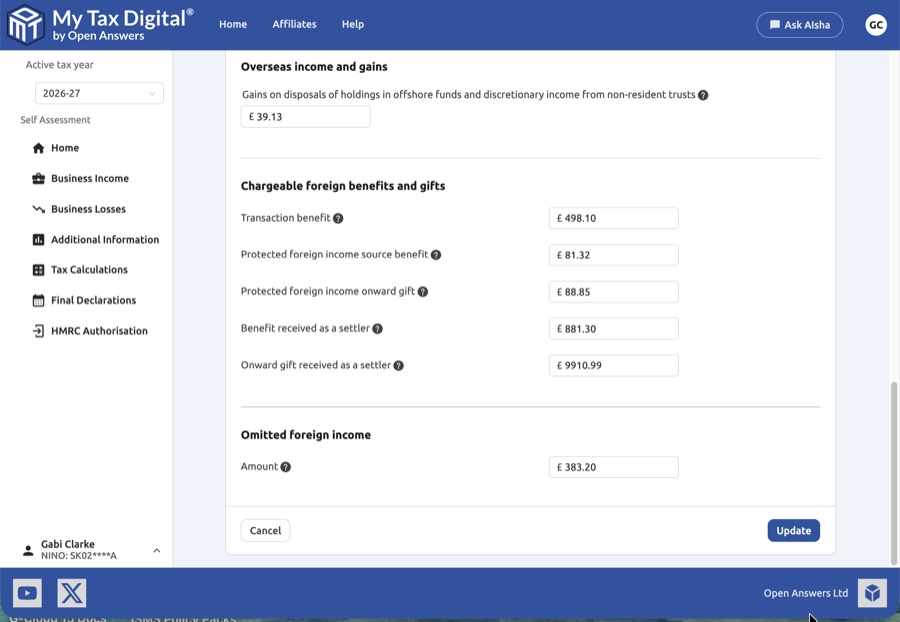
- Overseas income and gains: Report gains on disposals of holdings in offshore funds or discretionary income from non-resident trusts. Note: Under UK tax rules, gains from offshore funds — whether reporting or non-reporting — are taxed as income, not as capital gains. HMRC's calculation engine applies income tax rates to these figures; they do not benefit from the Capital Gains annual exempt amount or CGT rates. If you believe a different tax treatment applies to your specific fund, seek advice from a tax adviser.
- Chargeable foreign benefits and gifts: Record benefits or gifts received as a "settler," as well as protected foreign income source benefits.
- Omitted foreign income: A dedicated field to capture any foreign income previously excluded.
These items are reported on SA106 (overseas income and gains section).
5. Finalising Your Submission
Once you have entered all relevant income figures and references:
- Review: Ensure all figures (especially foreign tax and taxable amounts) match your supporting certificates or financial records.
- Submit / Update:
- If this is your first submission for Other Income this year, the primary button will be labeled Submit.
- If you are modifying existing records, the button will be labeled Update.
- Delete All: Use the red Delete link at the very bottom of the overview page to clear all "Other Income" data for the selected tax year.
- Cancel: Click Cancel to discard your current changes and return to the main dashboard.


