

Employment Non PAYE Income
This guide explains how to use the My Tax Digital interface to record and manage employment income that has not been taxed through the standard Pay As You Earn (PAYE) system, such as tips or gratuities.
1. The Non PAYE Income Overview
The Employment Non PAYE Income screen provides a summary of untaxed income sources for the selected tax year.
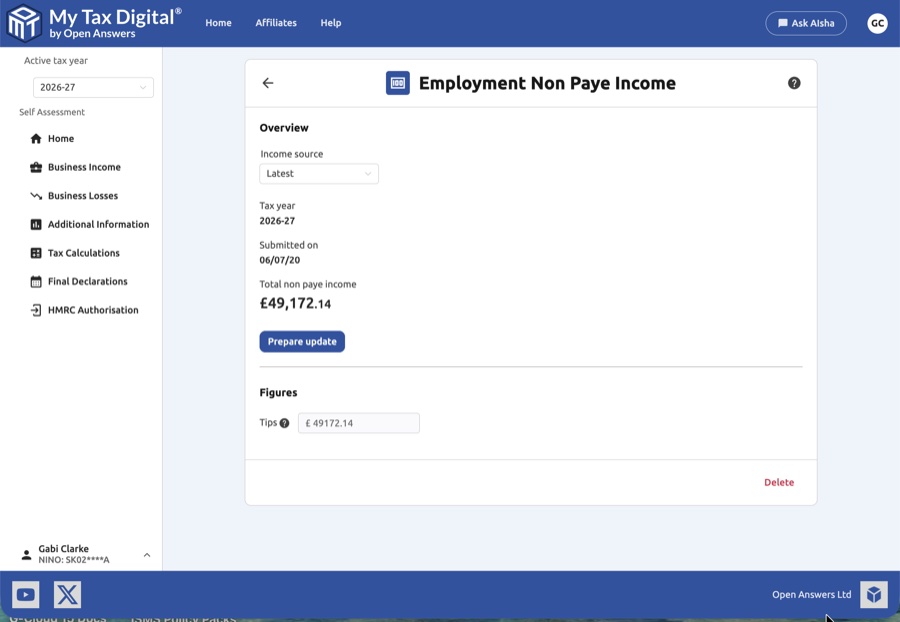
- Income Source: Use the dropdown menu to toggle between different versions of the data:
- HMRC: Displays the figures provided directly to HMRC by third parties.
- User: Displays the figures you have manually entered.
- Latest: Shows the most up-to-date combination of records.
- Tax Year Context: Verify the Tax year shown and the date the data was last Submitted on.
- Total non paye income: Displays the cumulative total of all figures entered below.
- Prepare update: Click this button to unlock the input fields and begin modifying your figures.
2. Managing Figures
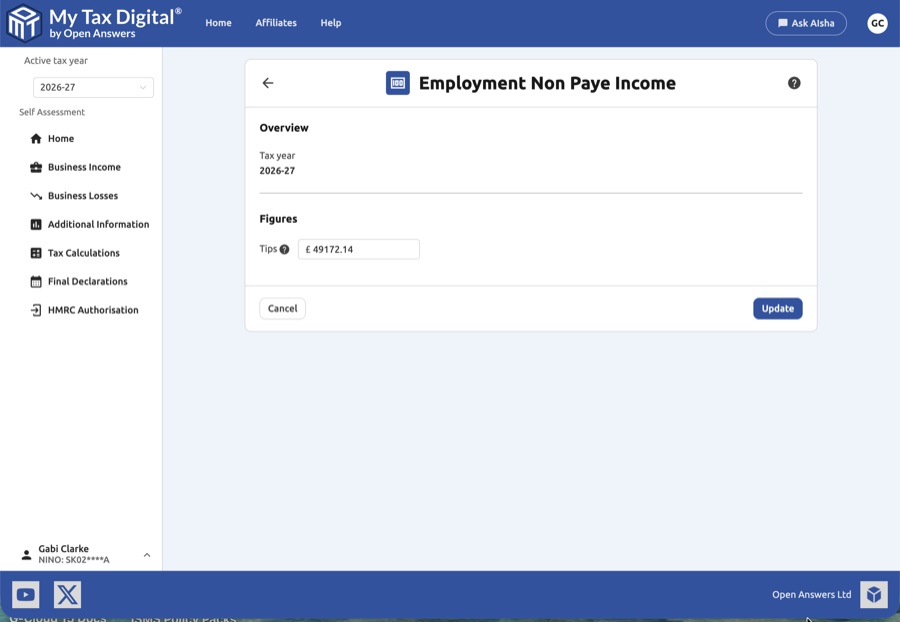
This section is used to report specific types of untaxed income received during your employment.
| Category | Description | SA102 |
|---|---|---|
| Tips | Enter the total amount of cash tips or gratuities received that were not processed through your employer's payroll. | Box 3 |
Tips and other payments not processed through PAYE are reported on SA102 Box 3 (Tips and other payments not on P60).
- Help Tooltip: Click the question mark (?) icon next to the Tips field for specific HMRC guidance on what qualifies as non-PAYE income versus what should be handled by an employer's "TRONC" system.
3. Finalising Your Submission
Once you have entered your total untaxed income from records like your personal tip logs:
- Update / Submit:
- If this is your first submission for non-PAYE income this year, the main button will be labeled Submit.
- Delete: Click the red Delete link at the bottom of the overview screen to remove all non-PAYE income records for this specific year.
- Cancel: Click Cancel to discard any edits and return to the previous screen without saving.
Important Consideration
Ensure you are not duplicating income. If your employer includes tips on your P60, they should be recorded under the Financial Details section of your employment, not here.


